Shaping order
out of chaos
Perseus
Perseus
Perseus is a healthcare software solution that simplifies the ETL (Extract, Transform, Load) process for converting healthcare data into the OMOP Common Data Model. Its flexible, visual environment streamlines workflows, reduces errors, and enables efficient data transformations.
Perseus is a healthcare software solution that simplifies the ETL (Extract, Transform, Load) process for converting healthcare data into the OMOP Common Data Model. Its flexible, visual environment streamlines workflows, reduces errors, and enables efficient data transformations.
Contribution
Contribution
UX Design
UX Design
User Study
User Study
User Testing
User Testing
Year
Year
2021
2021
User Study
User Study
Problem
Converting healthcare data to OMOP CDM was inefficient and error-prone due to rigid workflows and limited automation.
Problem
Converting healthcare data to OMOP CDM was inefficient and error-prone due to rigid workflows and limited automation.
Problem
Converting healthcare data to OMOP CDM was inefficient and error-prone due to rigid workflows and limited automation.
Methodology
User interviews with developers and database specialists, plus workflow observations, to uncover ETL pain points.
Methodology
User interviews with developers and database specialists, plus workflow observations, to uncover ETL pain points.
Methodology
User interviews with developers and database specialists, plus workflow observations, to uncover ETL pain points.
Key Insights
Key Insights
Process Simplification
The system must break down the data conversion workflow into smaller, manageable stages to reduce complexity and improve
user focus.
Process Simplification
The system must break down the data conversion workflow into smaller, manageable stages to reduce complexity and improve
user focus.
Process Simplification
The system must break down the data conversion workflow into smaller, manageable stages to reduce complexity and improve
user focus.
Mapping Control
The system must allow users to intuitively map source tables and fields to target tables, minimizing mapping errors.
Mapping Control
The system must allow users to intuitively map source tables and fields to target tables, minimizing mapping errors.
Mapping Control
The system must allow users to intuitively map source tables and fields to target tables, minimizing mapping errors.
Conversion Conditions
The system must enable users to define specific conditions for each field to ensure accurate data conversion.
Conversion Conditions
The system must enable users to define specific conditions for each field to ensure accurate data conversion.
Conversion Conditions
The system must enable users to define specific conditions for each field to ensure accurate data conversion.
Transformations and Vocabulary Lookups
The system should support transformations and vocabulary lookups to standardize data fields and handle complex conversions.
Transformations and Vocabulary Lookups
The system should support transformations and vocabulary lookups to standardize data fields and handle complex conversions.
Design
Design
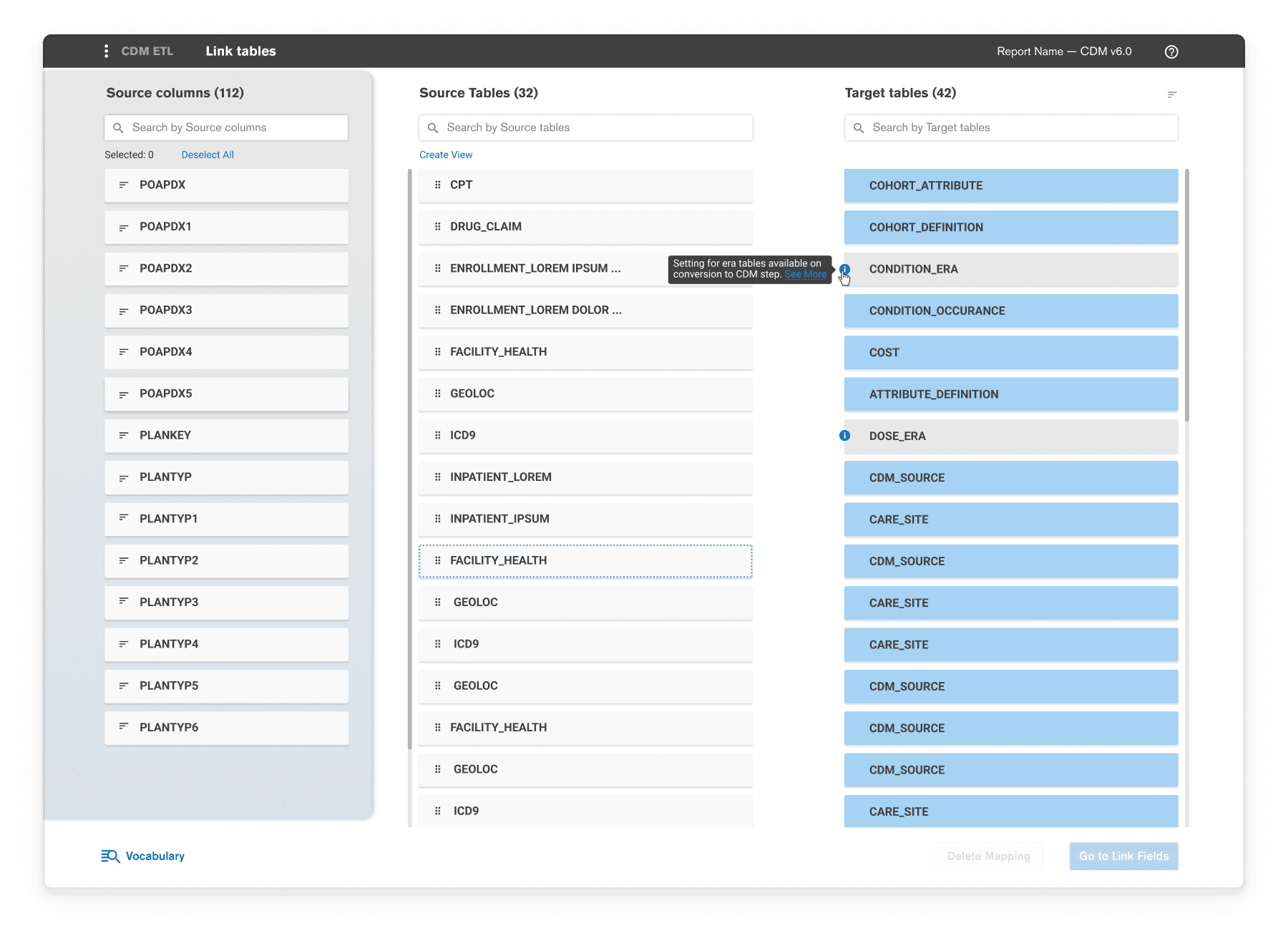
Linking Tables
Stage-Based Workflow
The data conversion process was divided into distinct stages: Pre-processing, Mapping, and Conversion. Separating each stage ensured users could focus on one step at a time.
Stage-Based Workflow
The data conversion process was divided into distinct stages: Pre-processing, Mapping, and Conversion. Separating each stage ensured users could focus on one step at a time.
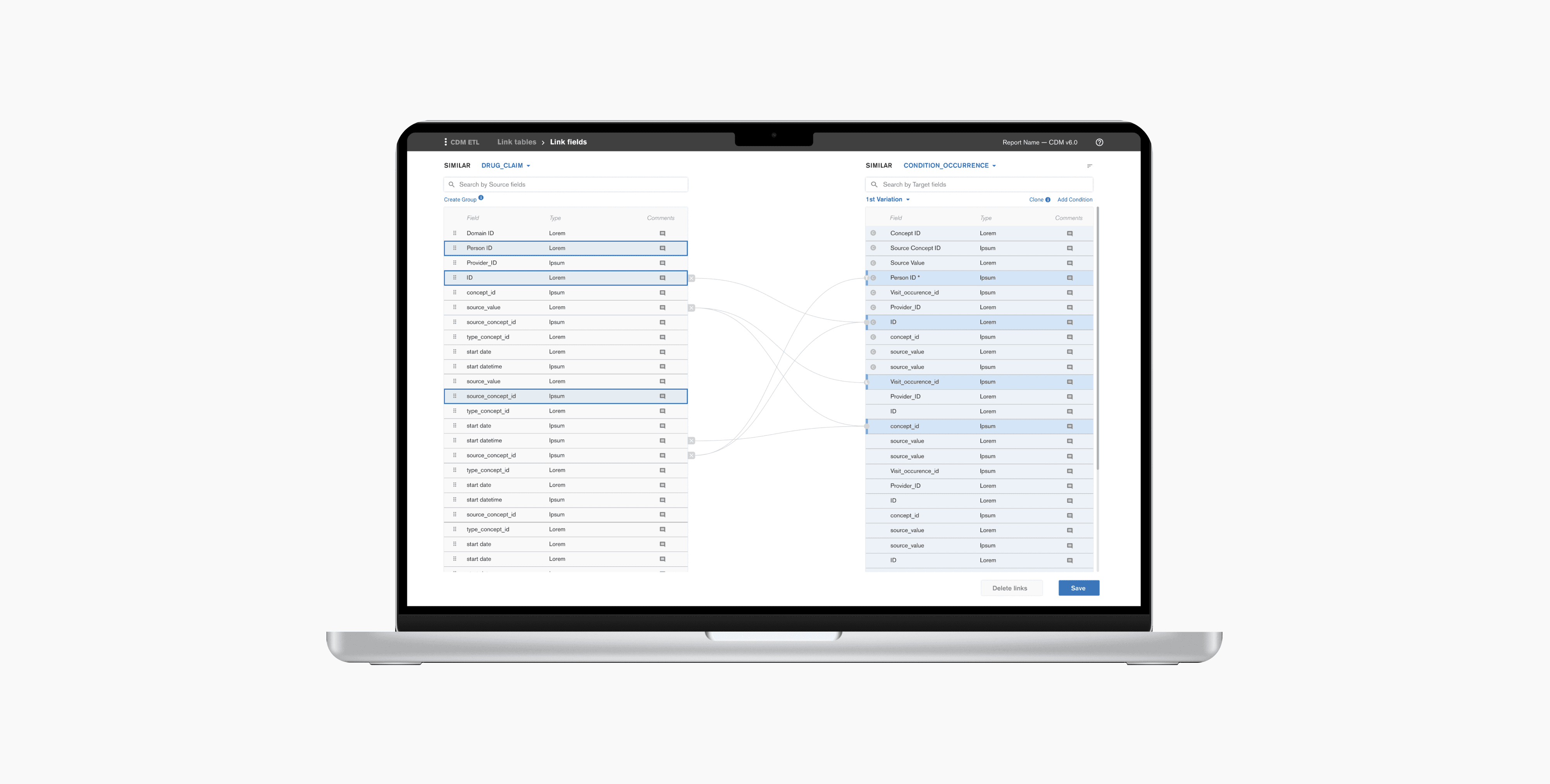
Intuitive Mapping Interface
Visual links and an easy-to-use control system allow users to map source and target tables and fields with minimal friction.
Intuitive Mapping Interface
Visual links and an easy-to-use control system allow users to map source and target tables and fields with minimal friction.
Developer Console for Advanced Customization
A dedicated console enables users to specify complex field conversion conditions as needed.
Developer Console for Advanced Customization
A dedicated console enables users to specify complex field conversion conditions as needed.
Transformation and Lookup Functionality
The console also supports field value transformations using SQL functions or lookups, providing proficient users with greater control and flexibility.
Transformation and Lookup Functionality
The console also supports field value transformations using SQL functions or lookups, providing proficient users with greater control and flexibility.
Evaluation
Evaluation
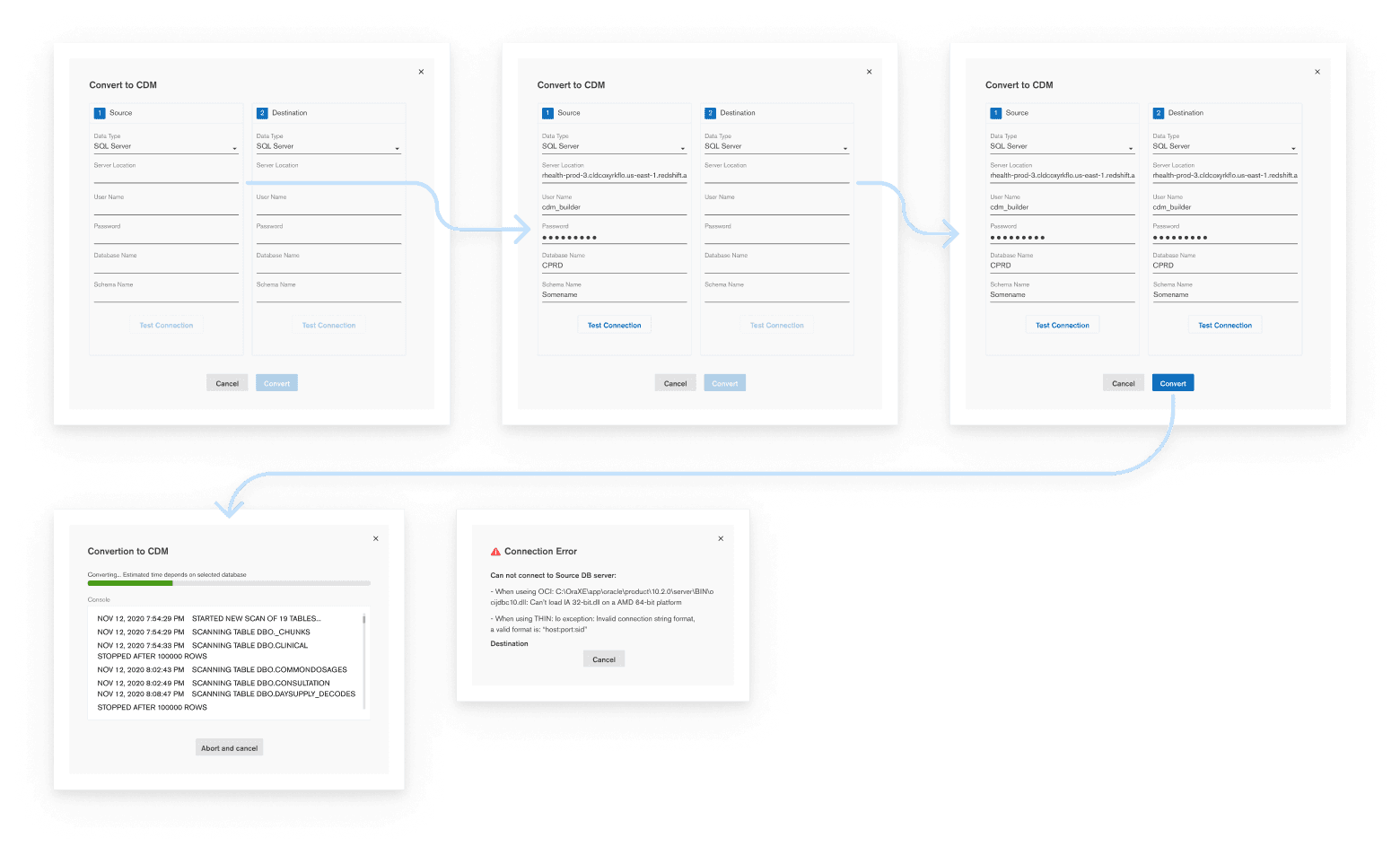
Data Conversion Flow
Data Conversion Flow
Objective
Objective
To assess the usability and efficiency of Perseus in simplifying the ETL process and supporting key user tasks.
To assess the usability and efficiency of Perseus in simplifying the ETL process and supporting key user tasks.
To assess the usability and efficiency of Perseus in simplifying the ETL process and supporting key user tasks.
Approach
Approach
Usability testing with the users utilizing Figma prototypes.
Usability testing with the users utilizing Figma prototypes.
Usability testing with the users utilizing Figma prototypes.
Tasks focused on pre-processing, mapping, and conversion, with performance metrics such as task completion rate, time-on-task, and error rate recorded.
Tasks focused on pre-processing, mapping, and conversion, with performance metrics such as task completion rate, time-on-task, and error rate recorded.
Tasks focused on pre-processing, mapping, and conversion, with performance metrics such as task completion rate, time-on-task, and error rate recorded.
Think-aloud protocols captured real-time user feedback and insights.
Think-aloud protocols captured real-time user feedback and insights.
Think-aloud protocols captured real-time user feedback and insights.
Results
Results
The stage-based workflow reduced complexity and improved task focus.
The stage-based workflow reduced complexity and improved task focus.
The stage-based workflow reduced complexity and improved task focus.
Visual mapping tools enhanced efficiency and reduced errors.
Visual mapping tools enhanced efficiency and reduced errors.
Visual mapping tools enhanced efficiency and reduced errors.
Advanced transformation tools provided flexibility for expert users.
Advanced transformation tools provided flexibility for expert users.
Advanced transformation tools provided flexibility for expert users.
Iterative improvements based on feedback included refined progress indicators and enhanced error notifications, further boosting usability.
Iterative improvements based on feedback included refined progress indicators and enhanced error notifications, further boosting usability.
Iterative improvements based on feedback included refined progress indicators and enhanced error notifications, further boosting usability.
Outcomes
Outcomes
Three-Step Workflow
Clear Pre-processing, Mapping, and Conversion stages with intuitive navigation.
Three-Step Workflow
Clear Pre-processing, Mapping, and Conversion stages with intuitive navigation.
Three-Step Workflow
Clear Pre-processing, Mapping, and Conversion stages with intuitive navigation.
Interactive Mapping Tools
Drag-and-drop features for linking source and target tables, making the process easier to manage.
Interactive Mapping Tools
Drag-and-drop features for linking source and target tables, making the process easier to manage.
Interactive Mapping Tools
Drag-and-drop features for linking source and target tables, making the process easier to manage.
Developer Console
Advanced options for defining custom conditions and executing transformations.
Developer Console
Advanced options for defining custom conditions and executing transformations.
Developer Console
Advanced options for defining custom conditions and executing transformations.
Real-Time Feedback
Immediate guidance and error messages to keep users on track.
Real-Time Feedback
Immediate guidance and error messages to keep users on track.
Real-Time Feedback
Immediate guidance and error messages to keep users on track.
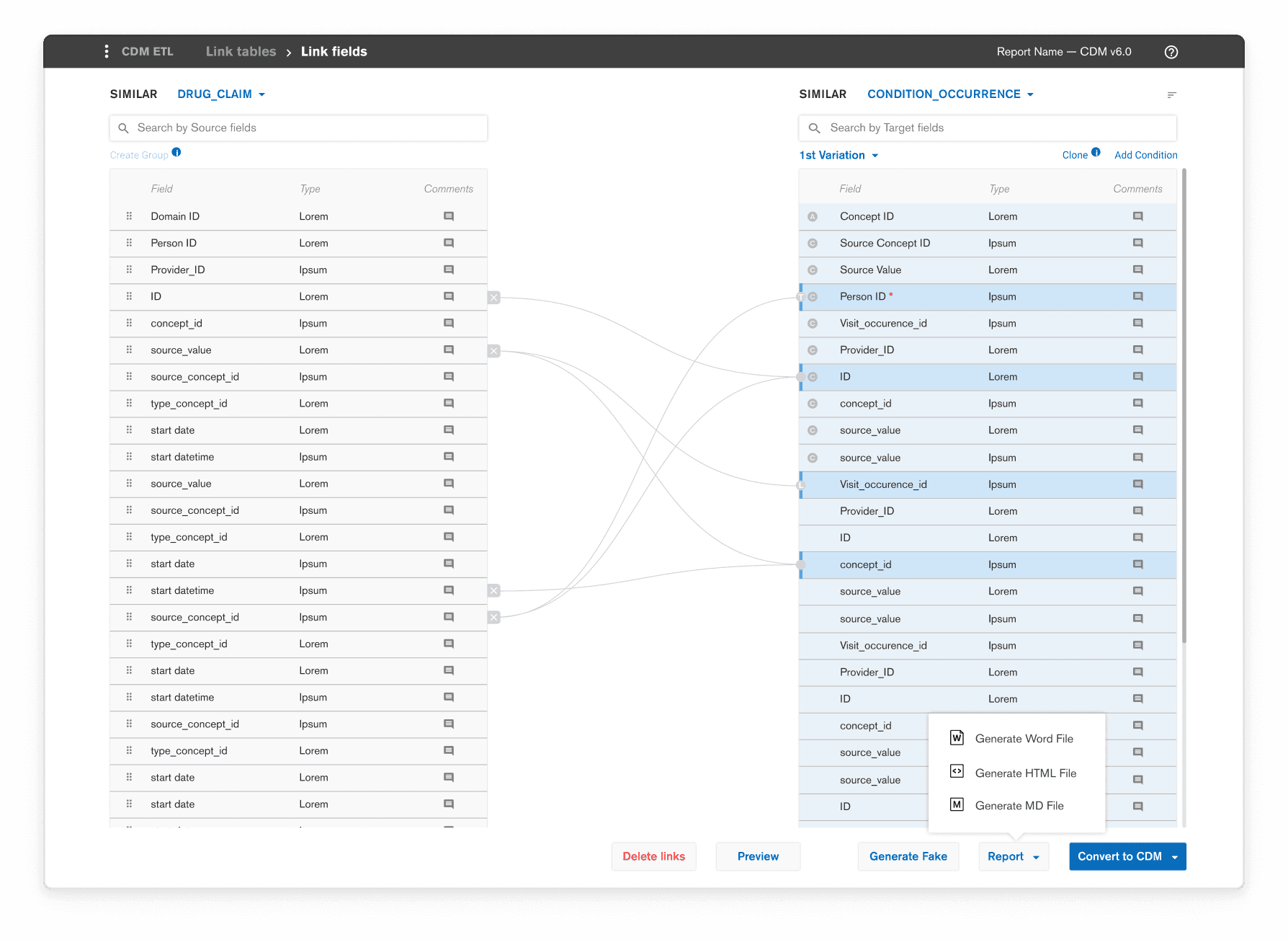
Visual Links for Fields
Impact
Impact
Users praised the interface for improving workflow clarity and providing advanced transformation options and convenient controls.
Users praised the interface for improving workflow clarity and providing advanced transformation options and convenient controls.
Users praised the interface for improving workflow clarity and providing advanced transformation options and convenient controls.
Reduced time spent on manual data mapping tasks by 30%.
Reduced time spent on manual data mapping tasks by 30%.
Reduced time spent on manual data mapping tasks by 30%.
Decreased data mapping errors by 20%.
Decreased data mapping errors by 20%.
Decreased data mapping errors by 20%.
Team
Team
Danil Gusev, Anna Karpushina: UX/UI design
Software Country: Software implementation
Danil Gusev, Anna Karpushina: UX/UI design
Software Country: Software implementation
Other Projects
Other Projects